Activities w/ multiple start times but varies by day
How do we set up activities like our Quick Refresh, which has morning and afternoon options but not each day?
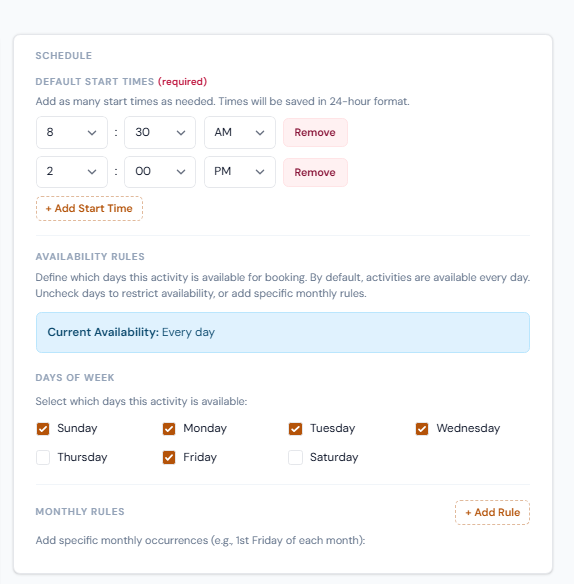
Ex: Quick Refresh by standard is Sun, Mon, Tuesday, Wednesday, and Friday mornings, but also on Sunday afternoons. Also can be booked on an as-needed basis
Log in to comment and vote
Comments7
Reservations Team
Jul 10
•Merged request
•1 vote
Days of Week
If we don’t want something available on the calendar as “standard” but only want to be able to schedule/add it on an as-needed/by request basis, what should we check here?
When I tried to uncheck all days, it defaulted to all days checked.
Example:
We do not offer our Guided Lionfish Dive regularly (not even on a monthly basis) but will book it for a customer when requested. How do we add the activity to our catalog but not our standard weekly or monthly availability calendar?
David Aidekman
Jul 8
Got it. The current model uses those dates for “availability rules” to present activities as bookable in the booking drawer and calendar. It is also used for the drag-and-drop so an event can only be moved to another slot when it is available (and prevent dropping when it isn’t offered). We’ll need to adjust that model to accommodate by request days too.
To be sure we understand the requirements, which of these are correct:
Some (most?) activities have a recurring, bookable schedule (this is mostly supported by the current event templates);
Some activities can be booked on “non-available” days by customer request (OR is that all activities have this attribute as being bookable on request?);
Some activities are not “offered” as available ever, and only booked by request;
Some activities are only available on certain days of the week (or month) and therefore has certain days that are not bookable, even on request;
Reservations Team
Jul 8
You’re going to hate me….
Most of those statements are correct, depending on the activity 🫣
Some activities have a recurring, bookable schedule (this is mostly supported by the current event templates);
Some activities and all specialty courses are not “offered” as available ever, and only booked by request;
almost every activity can be booked by request on “non-available” days (depending on staff availability), there are a very very small number of activities (like the Dusk Boat) that cannot be booked on non-available days, that we likely can just be sure to ensure we don’t book them on non-available days internally. There’s also always a world where we might want to be able to schedule a special event where we would run a dusk boat on a different day.
I hope that makes sense!
David Aidekman
Jul 8
Great — this actually tightens rather than expands the taxonomy.
It seems like a two-part approach will solve nearly all situations:
Some recurring activities auto-appear on the calendar as bookable on a set schedule.
Every activity can be booked on any day by request; this is true for activities that are on the calendar and activities that are never on the calendar.
There may be tiny exceptions, like the Dusk Boat, where it might help to have a warning about days when it shouldn’t be booked. But even this doesn’t sound like a rigid “block” on never allowing bookings on specific days of the week.
If I’m misunderstanding, please describe the attributes of activities that wouldn’t fit in #1 or #2.
Reservations Team
Jul 9
That is correct!
David Aidekman
Jul 10
This management is now fully reworked based on the comments. You can choose which sessions should be shown in the calendar as available. All other sessions are bookable on request. Click each cell to toggle what shows on the calendar or not. Any activity can still be created on request or dragged/dropped onto another day.
Reservations Team
Jul 8
Maybe in the overall activities page/drawer, these could be toggled via clicking to select/de-select within each day? That way some days an item could be offered in the morning only but afternoon only (or both) on other days?