Review staff planning and calendar configuration
Request:
Review how staff planning, activities, operations, and special events should be displayed within the Fathom Bay calendar/planning module.
Context:
In our current system, When 2 Work, the planning overview is our single source of truth for the weekly operation. This is where staff can see everything that is planned for the week.
The current overview in W2W includes several categories, such as:
Courses, guided dives, boat dives, and other water-based activities
Front desk, office staff, and other non-diving staff
Shop/location planning
Closures or location-specific notes
Special events
Staff training
For example, in the current system:
All water-work is shown in purple.
Each location has front desk staff shown in their own location color.
Delfins is shown in fuchsia.
Dive Inn is shown in blue.
Hamlet is shown in orange.
The overview can also show that Dive Inn is closed on Friday.
A clean-up dive event is shown at Dive Inn on Saturday.
Duncan and Niels are shown as doing staff training with the Avelo system.
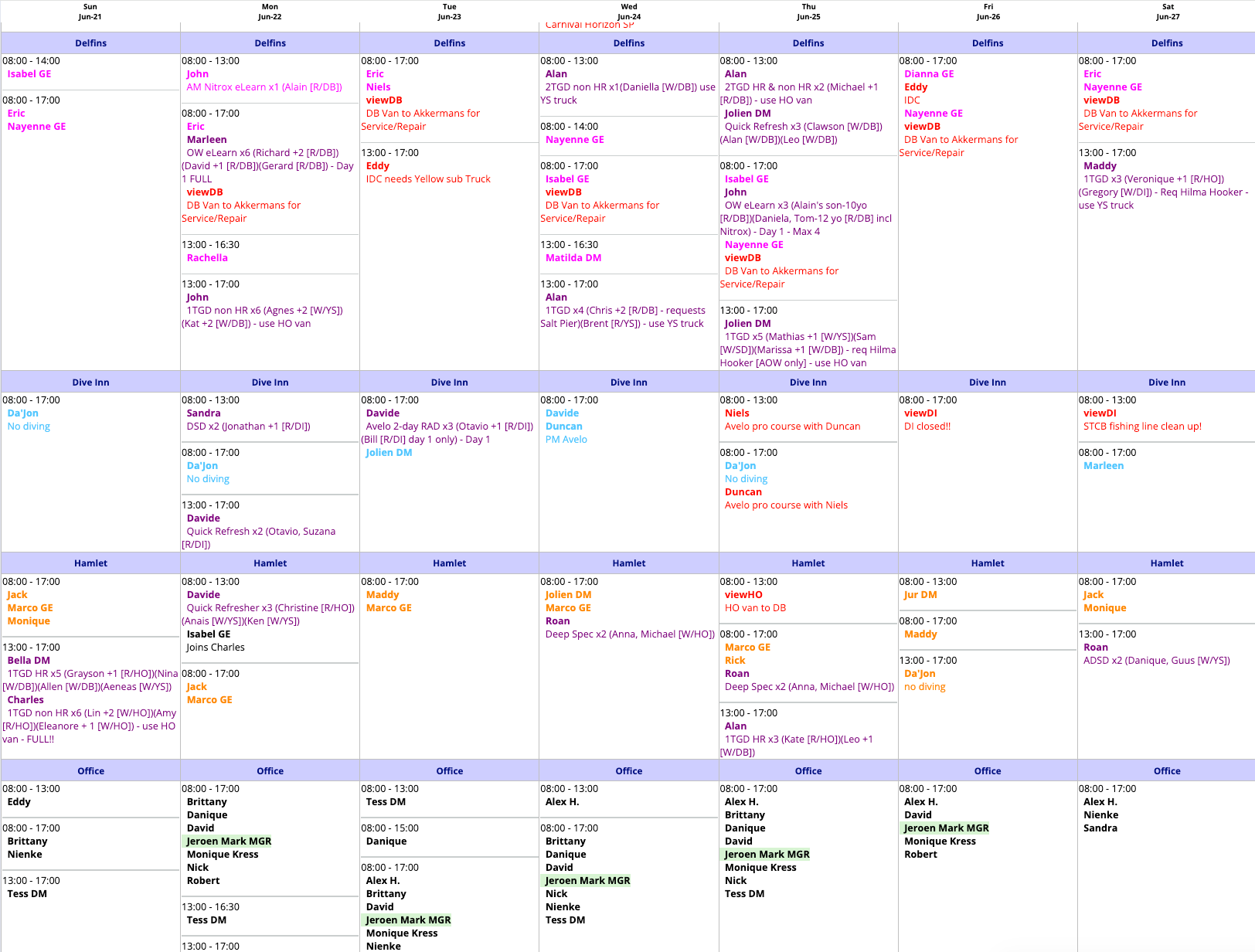
We may not need to copy the exact color coding into Fathom Bay, but the way the information is organized currently works well for our operation. The UI itself could possibly be improved, but the operational structure is important.
Goal:
Determine whether the Fathom Bay calendar/planning module should be used in the same way as our current When 2 Work overview: as one central view for all weekly planning information. Activities + Staffing on locations, special events, etc?
Main questions:
Do we want the Fathom Bay calendar view to show courses, boat dives, guided dives, front desk staff, office staff, non-diving staff, location notes, and special events in one overview?
If yes, what is the best way to combine these different planning types in one view without making the calendar too crowded?
How do other dive shops usually organize this type of planning in Fathom Bay or similar systems?
Operational reason:
For our operation, it is important to have a company-wide overview at a glance. This is especially important for the Planning team.
Planning often needs to:
Switch staff between locations.
Replace or switch instructors on a course.
Check who is working where.
See which activities are happening across all locations.
Review both activities and staffing in the same context.
If users need to constantly toggle between separate views such as “Activities,” “Operations,” and “Staff,” this could make planning slower and less practical.
Suggested direction:
Explore whether Fathom Bay can offer one combined planning/calendar view that includes both:
Activity planning, such as courses, guided dives, boat dives, and events
Staff planning, such as instructors, front desk, office, and non-diving staff
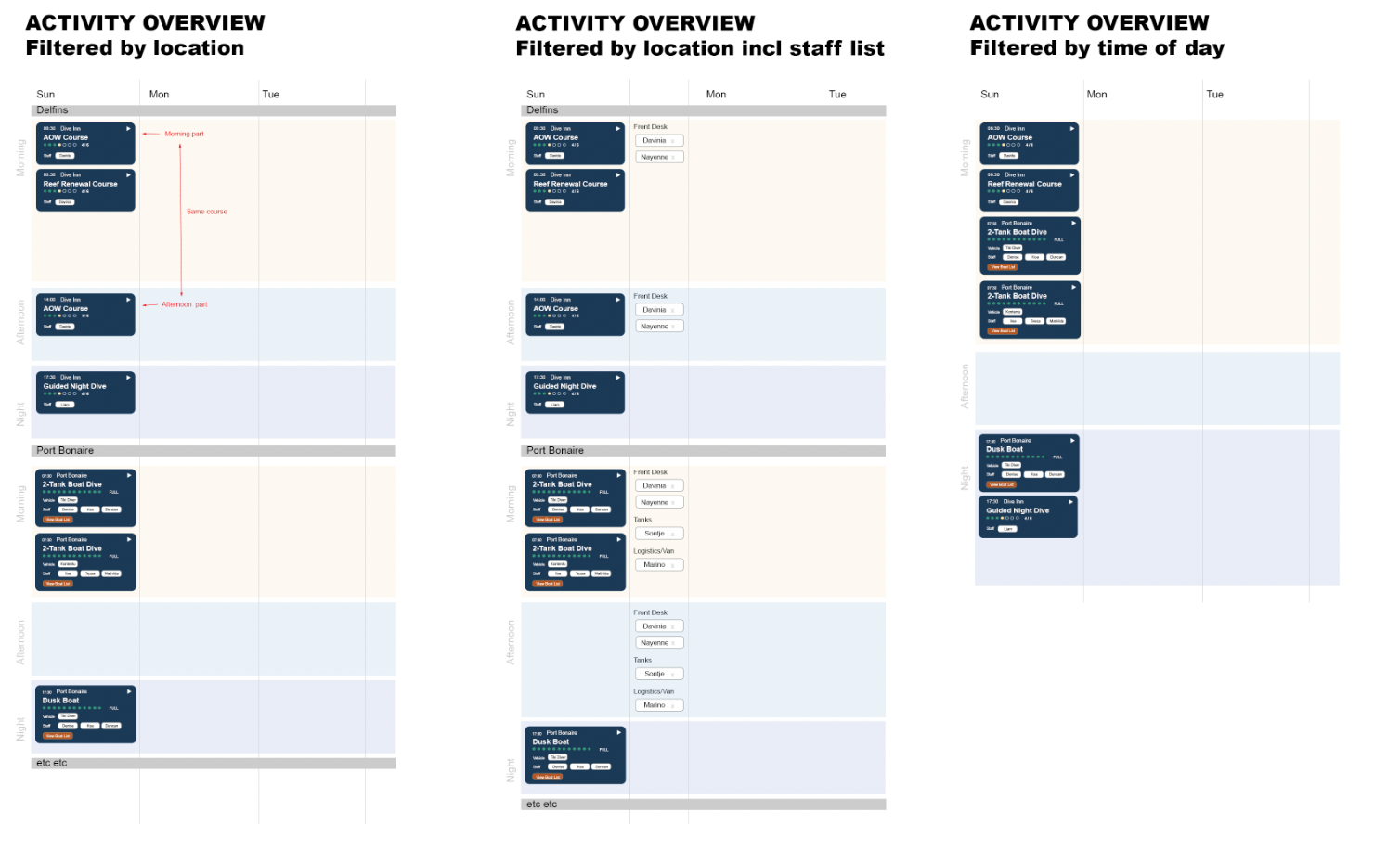
See Attachment for sketches of possible ways to display this within Fathom Bay. This also includes some filtering suggestions, i will make a seperate ticket for this.
Log in to comment and vote
Comments4
David Aidekman
Jul 5
We now also have the ability to add two types of elements to the calendar to help with planning and operations:
Add a “staff-only” activity to a session (or multiple sessions) and branch location. Staff can be assigned to these activities, but they do not take customer bookings. Staff training and other staff events can use this type. The staff assignments consider which staff are available, not participating in other activities and not on weekend or vacation day.
Add a note to any day or session and branch location. This note appears on the calendar and can be used for any purpose.
Click on the 3-dot menu at any day in the calendar to open this menu.
Please provide feedback on how we can improve both of these features.
Jeroen Scheper
Jul 6
Looks great again! Will check and let you know if there are any notes.
Marketing Team
Jul 4
•Merged request
•1 vote
Expand and Collapse Activities in Calendar
Request:
Review whether the activity overview would be more efficient and user-friendly if each activity block can be expanded or collapsed individually, instead of expanding all activity details at once.
Context:
When looking up a reservation or activity, it would be helpful to quickly scan the list of activity blocks in a collapsed view and only expand the specific activity that needs more detail. This could reduce visual clutter and make the overview easier to navigate, especially when a booking contains multiple activities.
Suggested functionality:
Show activity blocks in a collapsed state by default.
Allow the user to expand an individual activity block on click.
Goal:
Improve the speed and usability of reviewing reservations and activities by making the overview easier to scan and reducing unnecessary information on screen.
Reference:
A quick digital sketch has been made showing a possible collapsed versus expanded view. See Attachment 2.
Additional note:
There is also a question about boat lists, boat manifests, and the auto-fill logic for these. There is reason why i included a button for BOAT LIST instead of having all boat participants show in this calendar view. This is probably best explained in a call and should be noted for the next meeting.
David Aidekman
Jul 4
Here is an interim set of screenshots for a partial proposed solution for this request. The main activity card is trimmed to summary information. On click, the card can expand to show/hide the participants in the event with links to their booking information. The calendar has a broader view setting (per user) so that they can configure if they want to see more or less of the details in a single view.
The “Office” and “Shop” labels can be configured and added/removed so that you can create the “Front Desk” role or other roles. Different activity types: Boat Dive / Shore Dive / Course have different colors. We could instead or also use icons to distinguish, or different colors.
The location is labeled in text, but could also have coloring or some other type of indicator to distinguish. The user can also change the view to sort by location (instead of morning/afternoon/eve) to create that separation — preference for every user on their own and easy to swap with one click.
Please explore and see what is missing so we can continue to improve it.